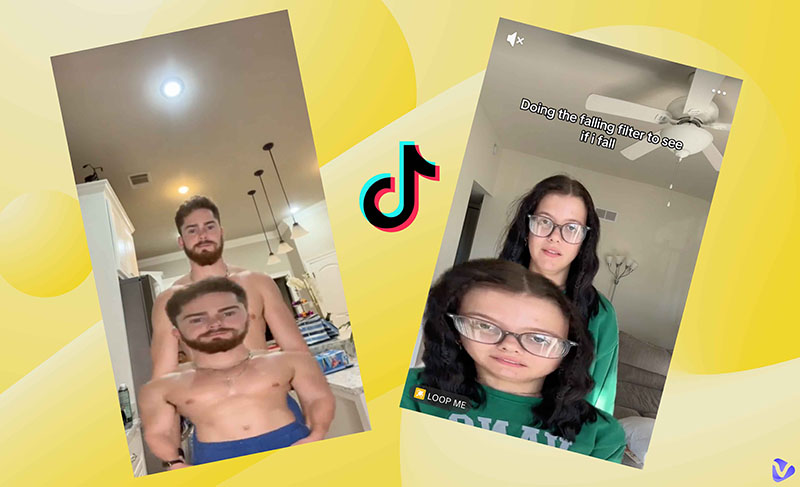
Scrolling TikTok and suddenly someone looks like they are dropping/falling like a paper? That’s the magic of the TikTok falling filter. This hilarious effect creates the illusion that a person is falling into the recording camera with dramatic effects. The falling filter trend is now going viral on social media.
Want to learn more about the falling down filter? In this guide, we will introduce how to find the falling filter on TikTok, how to use a falling filter free online, and even how to customize your own viral falling videos with the best tool!
- On This Page
-
What is a Falling Filter Challenge?
-
How to Use TikTok Falling Filter to Create Viral Videos
-
Paper Falling Filter Online Free: Make Funny Videos in Seconds
-
Customize Your Falling Down Filter Free with Text Prompts
Key features of Vidnoz AI image to video
-
Falling Filter Challenge App - More Customization in One Stop
What is a Falling Filter Challenge?
The falling filter challenge is a playful viral trend that leverages visual effects to simulate a dramatic drop or tumble. The filter can make you or even objects plummet from above to a scene with a lopping motion. You can fall into a party, a classroom, or a fantasy world as per your creativity.
The AI TikTok filter spreads quickly because it’s simple yet visually dramatic. Viewers love the shock factor and comedic timing. Mainly available on TikTok, videos with this effect have earned millions of views and shares. It’s perfect for pranks, reactions, or creative storytelling.
How to Use TikTok Falling Filter to Create Viral Videos
TikTok’s falling down filter is extremely addictive. No fancy equipment is needed, just a smartphone and creativity. Let’s check out the steps now!
How to use the falling down filter in TikTok
Step 1: Open TikTok, tap the Search icon, and type “loop me.” Browse videos and tap one to view the video.
Step 2: Tap “Use effect” in the bottom right. The camera will open automatically with the falling filter applied and ready to use.
Step 3: Stand straight, look at the screen for a few seconds, and press record.
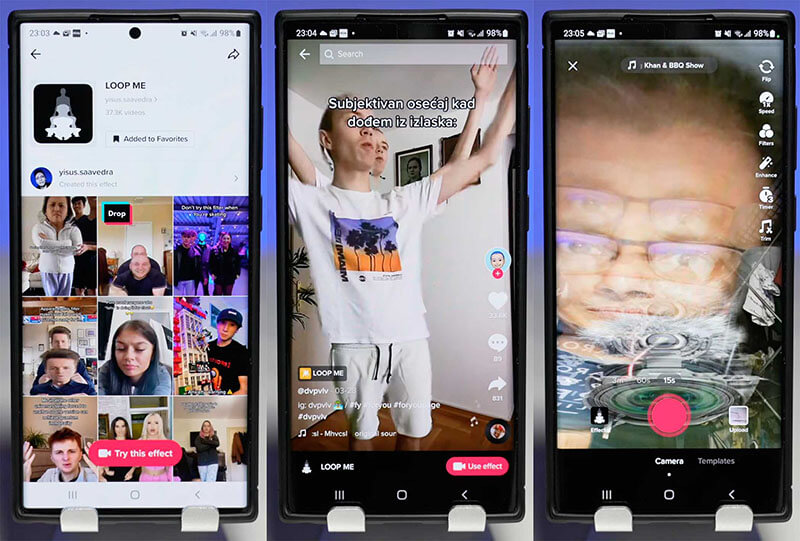
To boost your video’s appeal, add dramatic sound effects, such as a whooshing drop or suspenseful background music, to heighten the impact. You can exaggerate your facial expressions to show surprise or shock, and overlay engaging text to build anticipation and keep viewers watching until the end.
Paper Falling Filter Online Free: Make Funny Videos in Seconds
Where else can you get the falling filter free? Media.io is a brilliant choice. This web-based tool allows you to transform photos/videos (JPG, PNG, WEBP, HEIC, GIF, and MP4) into dramatic tumbling animations where subjects appear to collapse like falling paper. For users who want to create hilarious content for TikTok, Instagram Reels, and YouTube Shorts, Media.io is a great falling filter online free tool to check out! Let’s see how to use it easily.
Step 1. Navigate to Media.io’s free falling filter tool online.
Step 2. Upload a source image to get started. You will be redirected to the main interface. Sign in with an account to process.
Step 3. Click on the Generate button, and your video will be ready soon!

Customize Your Falling Down Filter Free with Text Prompts
While TikTok’s falling filter can make a person fall like a paper with a looping effect, that’s all it's about. There is not much customization you can do. If you want to have your own twist, Vidnoz is here to help. Simply describe how and where someone falls, and the AI will transform your text into a dynamic, realistic video.
With Vidnoz AI, you can set the background, style, and other elements of your falling scene. Whether you want to fall like a looping paper or fall into a fantasy castle, the tool can help you make it easily.
Convert Image to Video AI Online - Free
- Create a video from an image quickly for free.
- Use various AI models to turn photos into videos.
- Download and share the AI-generated video at no cost.
Convert Image to Video
How to customize a falling video with Vidnoz AI
Step 1. Head to Vidnoz image to video AI tool.
Step 2. Upload an image as a reference. Input the prompt to describe the falling scene. Adjust the video length.
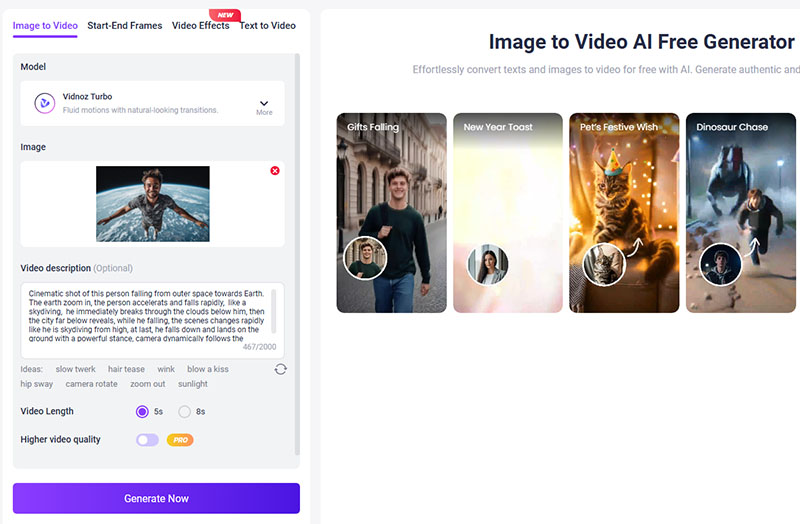
Step 3. Click on the Generate button, and the falling filter video will be ready soon!
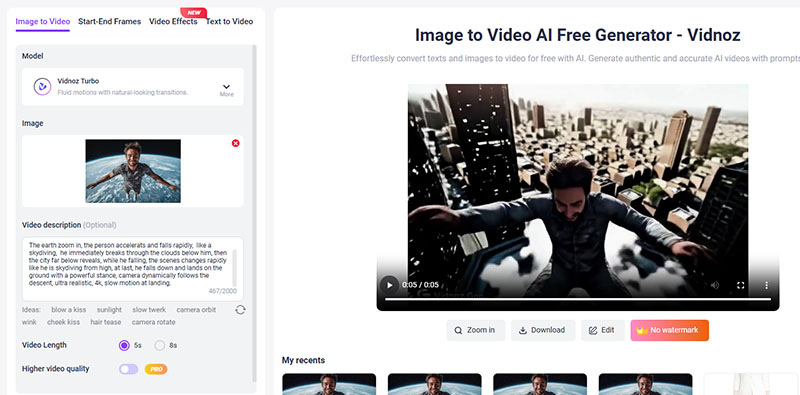
See the natural falling video that Vidnoz AI generated:

You can not only make a character fall but also make them talk! Try Vidnoz AI Talking Photo to create vivid, animated portraits that speak naturally!
Key features of Vidnoz AI image to video
Easy falling video creation from text: Simply input a text prompt to describe a falling scene, and this free AI video generator can make quick viral content without complex software or editing skills.
Customize any falling style: Unlike TikTok’s falling filter that resorts to real-time interaction, Vidnoz AI lets you adjust the fall's speed, direction, intensity, and environment through detailed prompts.
Seamless and natural video effect: Vidnoz AI can produce smooth and lifelike motions that blend elements realistically, which ensures the falling action looks fluid and professional. The built-in lip sync AI online free feature also allows you to animate speech accurately, so characters can talk realistically even while falling.
Fast AI processing in seconds: Vidnoz AI converts text or images into falling videos quickly, with generation times under one minute.
Various other video effects to experience: Vidnoz AI offers a collection of video effects for you to explore. For instance, AI kiss, AI hug, etc. You can even easily create a dance AI animation with your face for unlimited and diverse content needs.
Download video without watermark: Vidnoz AI lets you export your custom falling videos in high-quality MP4 format completely free of any branding or watermarks.
Falling Filter Challenge App - More Customization in One Stop
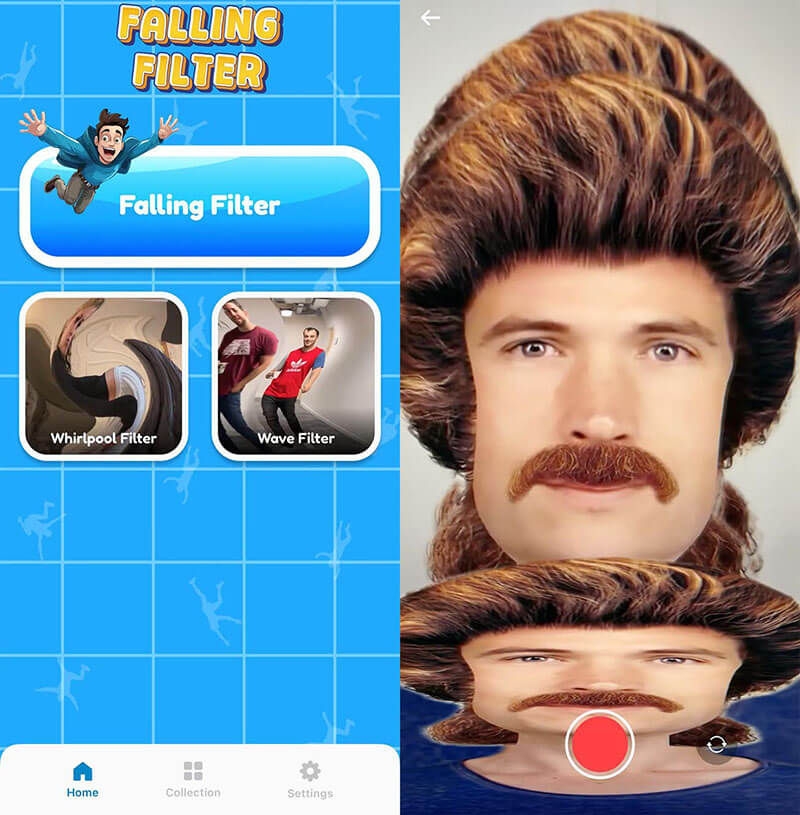
Want to make a falling filter video on the go? Just try the mobile apps, and the Falling Filter Challenge is a great choice. This simple app lets you recreate the viral falling video directly on your mobile device. Similar to TikTok’s falling filter, you can create a looping and falling video in real time with your front and rear cameras.
Aside from the classic falling filter effect, the app also includes creative options like the Whirlpool filter and Wave filter. These extra effects give you more variety for content creation.
The way to use it is very simple. Open the app, select the falling filter effect, and use the camera to record yourself. You can preview the falling motion in real time and then save the video directly to your phone. After that, just upload it to TikTok or Instagram and share the fun instantly.
Final Words
What is the falling filter, and how to create your own? Now you should know how to make one via TikTok or mobile apps. Alternatively, you can generate customized falling videos online with Vidnoz AI. The online AI video generator simply offers more creative control and smoother transitions, which can help you create a falling filter video with your own twist. What’s more, you can convert text or images into scroll-stopping videos for completely free. Just try it to turn your ideas into viral videos now!