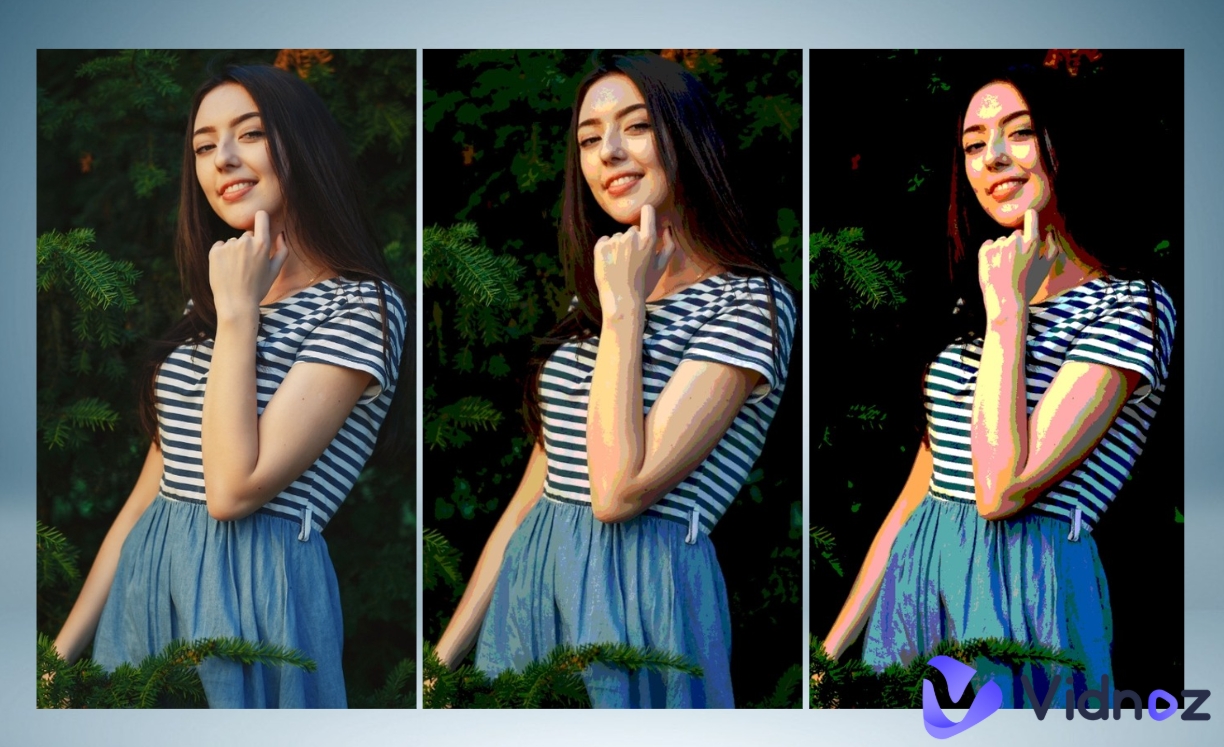
Want to posterize your photo and make it look like bold and colorful art? Posterizing simplifies the colors in your picture, giving it a fun and graphic style. Whether you want to turn your photos into posters for your wall, a gift, or just to share online, free online tools can help you do it with ease.
In the 2026 list, we’ll show you 6 easy-to-use websites that let you create posters from your photos with just a few clicks. Some even allow you to order posters of your pictures if you want a printed copy. Ready to make posters from your photos? Let’s get started!
- On This Page
-
Why Posterize Your Photos?
-
6 Online Tools to Posterize Your Photos Without Effort
1. Photoshop: A Multi-Functional Platform to Turn an Image into a Poster
2. Toolxox: Add a Posterize Effect to Your Photos with Ease
3. Pinetools: Fast and Simple Online Photo Posterizer
4. ImageOnline: Posterize a Photo in a Clear Interface
5. Imgonline: An Image Posterizer That Works on Multiple Photo Formats
6. Fotor: Reduce Image Colors with Posterization Effect
-
Not Limited to Posterize Your Photos! 3 Free AI Image Editors to Level Up Your Art Creation
1. Generate a Cartoon Image from a Real-Life Photo
2. Turn Yourself into a Ghibli Character with One Click
3. Make One Person in a Photo Talk Naturally with AI
Why Posterize Your Photos?
Posterization refers to converting images from a continuous gradation tone to ones with several regions. It helps people to create a simpler version of their images with fewer contrasting colors. Such an image editing method simplifies details of the images while keeping them striking, making them just look like pop art or a vintage poster. So why would you like to posterize your photos? Here are a few reasons:
● Stand out on social media: Posterized images attract people’s attention with their high-contrast look.
● Create unique wall art: Easily turn your photos into posters for your home or gifts.
● Fix low-quality pics: Posterizing can make photos look more artistic.
● Simple and fun: No design skills needed! Just upload, adjust, and download.
Vidnoz AI - Create Free Engaging AI Video with Talking Avatar
- Easily create professional AI videos with realistic avatars.
- Text-to-speech lip sync voices of different languages.
- 2800+ video templates for multiple scenarios.
6 Online Tools to Posterize Your Photos Without Effort
Want to posterize your photos quickly? The following 6 free online tools make it easy - no downloads or design skills needed! Let’s explore the best options to turn your photos into posters with no difficulty.
1. Photoshop: A Multi-Functional Platform to Turn an Image into a Poster

Want to posterize your photo like a pro? Adobe Photoshop is a powerful tool that lets you turn your photos into posters with just a few clicks. Its posterize feature gives you complete control, whether you want a subtle artistic effect or a bold pop-art look, it can make it for you.
Simply drag the slider (from 1 to 255) to adjust the color levels until you get the perfect look. You can even apply the effect to just part of your image for creative edits. Beyond posterization, Photoshop offers extra tools like the Healing Brush to clean up spots or imperfections, making your posters from your photos look polished and professional.
Pros
- Full control over posterization levels.
- Support to apply effects to selected areas only.
- ultiple advanced photo-editing tools included.
Cons
- Requires a subscription (not free).
- Steeper learning curve for beginners.
- Needs a powerful computer to run smoothly.
How to Posterize Your Photo with Photoshop?
Step 1. Open your photo in Photoshop (File > Open).
Step 2. Go to Image > Adjustments > Posterize.
Step 3. Adjust the slider (2-8 levels work best for a strong effect).
Step 4. Click OK to apply.
Step 5. (Optional) Use the Lasso Tool to select a specific area before posterizing for partial effects.
Step 6. Save your new poster-style image (File > Export > Save for Web).


2. Toolxox: Add a Posterize Effect to Your Photos with Ease

If you’re looking for a quick way to posterize your photo, Toolxox can be a practical option for you! This free online tool reduces colors in your image to create an artistic and poster-effect image with few clicks. Just upload your picture, then the tool will automatically adjust the color levels for the best posterized look. A great feature is that you can compare results instantly by seeing both the original and posterized versions.
Pros
- Free and web-based (no installation).
- Instant before/after image comparison.
- Simple one-click image editing process.
Cons
- Limited customization options.
- Lower resolution output for large files.
3. Pinetools: Fast and Simple Online Photo Posterizer

One of the free tools that are ideal for you to posterize your photos is Pinetools. With no need for learning image editing skills, the simple tool transforms your photo into posterized one in a short time. Just upload your image, and with two clicks, you'll have a stylized poster effect ready to download in PNG, JPG, or WEBP formats. It includes extra editing features like color inversion, image flipping, and brightness adjustment - handy for making final tweaks to the posters from your photos.
Pros
- Instant 2-click process to posterize images.
- Multiple export format options, including PNG, JPG, etc.
- Additional basic editing tools for a better image editing experience.
Cons
- No customizable image-editing option.
- Can't preview adjustments in real-time.
- Max 10MB file size limit.
4. ImageOnline: Posterize a Photo in a Clear Interface

For anyone who is exploring an easy method to posterize your photos online, ImageOnline is one of the perfect photo editors for that. On a clean and user-friendly interface, it allows users to add poster effects to their photos at their fingertips. All the users need to do is upload their image, choose from different posterization levels (2-255), and download the artwork instantly - completely free with no watermarks. Obviously, it is one of the picture posterizing tools with advanced built-in functions that help users convert their real life pictures to posterized ones.
The tool supports 5 languages, making it accessible worldwide. Whether you want to turn your photos into posters for personal use or creative projects, ImageOnline delivers quick results without complicated settings.
Pros
- Simple and clutter-free interface.
- Multiple posterization level options are provided.
- No usage limits or hidden costs.
- Support 5 languages for users around the world.
Cons
- Basic features only - no advanced editing features.
- No side-by-side preview.
- Limited file format support (JPG/PNG only).
5. Imgonline: An Image Posterizer That Works on Multiple Photo Formats

iMgonline shares professional image posterizing functions that users can take to edit their photos on this simple platform. Here, anyone can turn their pictures into a poster like an expert. It handles JPG, PNG, BMP, and more formats of images with simple processing. Just upload your image, adjust the color reduction level, and optionally convert it to black-and-white first for dramatic effects. Your posters from your photos can be downloaded in high-quality JPEG or PNG-24 formats. No registration is needed - just pure and quick image posterization.
Pros
- Supports multiple image formats, such as JPG and BMP.
- Optional black-and-white image conversion.
- High-quality image output files.
Cons
- Basic interface which not looked as modern one.
- No real-time image converting preview.
- File size limit (5MB).

Use PNG-24 for transparent backgrounds if needed.
6. Fotor: Reduce Image Colors with Posterization Effect

As a classic example of image posterizing tools, Fotor can be accessible online. It offers one-click posterization effects that transform ordinary images into eye-catching poster artwork in seconds. You may love its clear and simple operating interface, which even a newcomer can use for image editing. Just upload your photo, apply the preset effect, and download the posters made from your photos in seconds. Beyond posterization, Fotor provides creative tools like GoArt to turn photos into renaissance paintings, giving you more ways to enhance your photos.
Pros
- One-click posterization presets.
- Additional artistic image editors like GoArt.
- User-friendly interface ebay for even beginners.
Cons
- Watermark on the free version.
- Limited customization options.
- Requires sign-up for full features.
Not Limited to Posterize Your Photos! 3 Free AI Image Editors to Level Up Your Art Creation
To do more than just posterize your photos, you can take your creativity further with these 3 free AI-powered editors. Let’s explore more fun!
Vidnoz AI - Create Free Engaging AI Video with Talking Avatar
- Easily create professional AI videos with realistic avatars.
- Text-to-speech lip sync voices of different languages.
- 2800+ video templates for multiple scenarios.
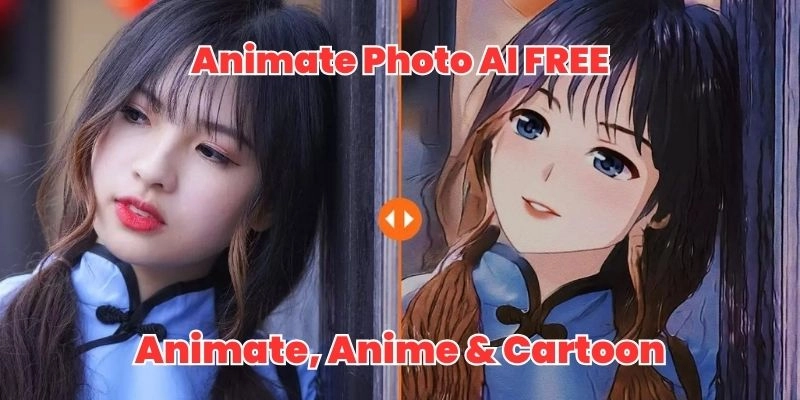
1. Generate a Cartoon Image from a Real-Life Photo

If you are tired of the same old real life photos? You can transform your pictures into vibrant cartoons with the Vidnoz AI Cartoon Generator! With advanced photo to cartoon AI, you can make your photos a stunning cartoon art in seconds - no technical skills are needed. No matter you want to create standout profile pictures, engaging social media content or personalized gifts/merchandise, this tool can be helpful for you.
Key Feature
- Upload any photo and get instant cartoon results.
- All AI generated images are free for commercial use.
- Work on both images and videos.
2. Turn Yourself into a Ghibli Character with One Click

Ever dreamed of starring in your own Studio Ghibli film? Now you can! The Vidnoz AI Ghibli Filter is a powerful AI tool to transform ordinary photos into enchanting Ghibli-style artwork within seconds. Simply Upload any portrait (JPG/PNG/WEBP), then the AI works on adding its Studio Ghibli effect to the target photos.
Key Feature
- Convert images to Ghibli-style posters instantly.
- Some photo inspirations are provided when users have no idea.'
- No image editing skill is needed.
3. Make One Person in a Photo Talk Naturally with AI

Ever tend to bring your favorite photos to life with AI? With advanced AI algorithms, now you can make a talking image with natural AI voices and lip syncing. Imagine creating fun talking avatars with simple clicks - Vidnoz AI Talking Photo makes it possible! This free tool is able to animate any portrait, syncing realistic mouth movements to your audio for amazingly natural results.
Key Feature
- Realistic static image to AI talking video conversion.
- Select from multiple languages, AI voices, and speaking speeds.
- Simple tool based on the Internet.
How to Create a Talking Photo in 3 Steps:
Step 1. Go to the Vidnoz AI Talking Photo tool, select "Upload Image" and choose a clear headshot.
Step 2. Type text for speech, then choose AI voiceover or record your voice. Pick a language and voice style (over 20 options).
Step 3. Click "Generate Video" to make the image alive in about 30 seconds. Preview and download your talking photo.

The Bottom Line
This guide covers everything you need to posterize your photos with clicks! We shared 6 free online tools to easily turn your photos into posters, from Photoshop to simple web apps like Toolxox and Pinetools. Plus, we introduced 3 bonus AI editors to level up your pics creation, including AI cartoon generator, AI Ghibli Studio and AI Talking Photo!
Whether you want to order posters of your photos, create social media art, or just have fun editing, these free tools help you do it all. Ready to make stunning posters from your photos? Pick a tool and start creating today!
Vidnoz AI - Create Free Engaging AI Video with Talking Avatar
- Easily create professional AI videos with realistic avatars.
- Text-to-speech lip sync voices of different languages.
- 2800+ video templates for multiple scenarios.