Christmas Eve is just around the corner. Festive decorations are everywhere, and as always, people are more cheerful and excited than ever.
If you’re a marketer who wants to gain customers’ attention or simply someone wishing to stand out from the crowd, what can be better than creating engaging videos?
With AI, it will take only a few minutes without a high cost. You won’t even need to have technical skills; only a short script and a good photo will do. Simply put, you can turn a selfie into a dancing elf, a mini comic, or a talking greeting on the go.
Wondering how to do it? Here’s how you can make a free Christmas video with your face!

- On This Page
-
Why Create a Personalized Christmas Video with Your Face?
-
Way 1. Create Free Christmas Video with Your Talking Face [Vidnoz]
-
Way 2. Elf Yourself for a Funny Christmas Video Creation with Your Own Face
Why Create a Personalized Christmas Video with Your Face?
Personalized videos are always better than generic ones. And the reason is obvious: they carry your voice, your face, and your timing. That means people will remember that in the long run.
Let’s explore why you shouldn’t miss out on creating a Christmas video with your face free:
- Unique, Thoughtful Greetings: A video where you appear dancing or speaking yourself shows that you made an effort for your followers. That’s surely more memorable than a stock clip or boring text.
- Engaging, Personal Connection: Seeing a familiar face evokes emotions, and you get more appraisals and attention. After all, it builds personal connection, so your family or followers will feel this like a virtual hug.
- Unforgettable Commemoration: Want to announce news, mark a year, or create a memory? A short personalized Christmas video can become a gift that’s convenient to keep and rewatch anytime.
Now that you know all the perks, aren’t you ready to make one?
Keep reading to learn about the two most reliable ways: one for polished talking-avatar greetings (Vidnoz) and one for goofy dance clips (Elf Yourself).
Way 1. Create Free Christmas Video with Your Talking Face [Vidnoz]
Vidnoz allows users to create videos with 1500+ AI avatars, 2800+ templates, and 1830+ realistic AI voices. That means you will never be short on ideas or templates for your free Christmas video with your face.
Create Your AI Talking Avatar - FREE
- 1900+ realistic AI avatars of different races
- Vivid lip-syncing AI voices & gestures
- Support 140+ languages with multiple accents
On top of that, you will be able to make a greeting that sounds and looks just like you. As it offers a wide template library and automatically does lip-sync, the avatar’s mouth matches the voice perfectly.
In a nutshell, there’s no easier way to create an engaging Christmas video with a talking face than with Vidnoz. Can’t believe it? Look at its key features, and you’ll understand yourself:
- Creates custom AI avatars with your own photo (digital-twin style).
- Offers a large library of editable Christmas-themed templates to choose from.
- AI text-to-speech, uploading your voice, and avatar lip-sync to the audio features.
- Supports more than 140 languages to let people generate multilingual Christmas videos.
- Helps create AI Christmas videos within minutes to save cost and increase ROI.
Without any further delay, let’s dig into the detailed steps of using it to create a free Christmas video with your face:
Step 1 Create Your Free Vidnoz Account
Go to the official Vidnoz website and sign up. And then, log in to have access to all the talking avatars and templates.
Step 2 Choose a Christmas Template
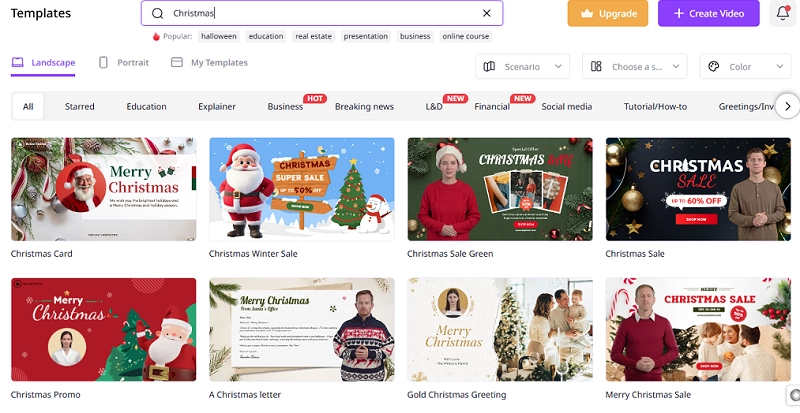
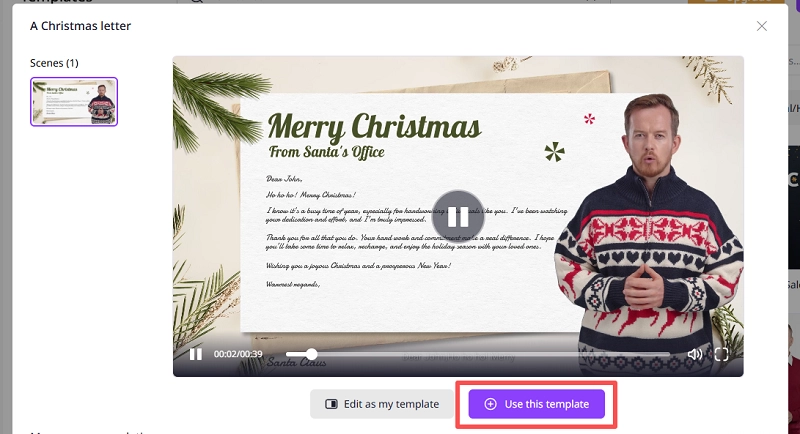
Now, it’s time to click on “Templates.” And then you need to search “Christmas” in the search bar to be specific and find the relevant ones. Scroll down and preview all the Christmas video templates and pick the one that fits your tone. You will find a variety of options there, like Christmas Sale, Christmas Promo, etc.
Step 3 Make Your Talking Avatar
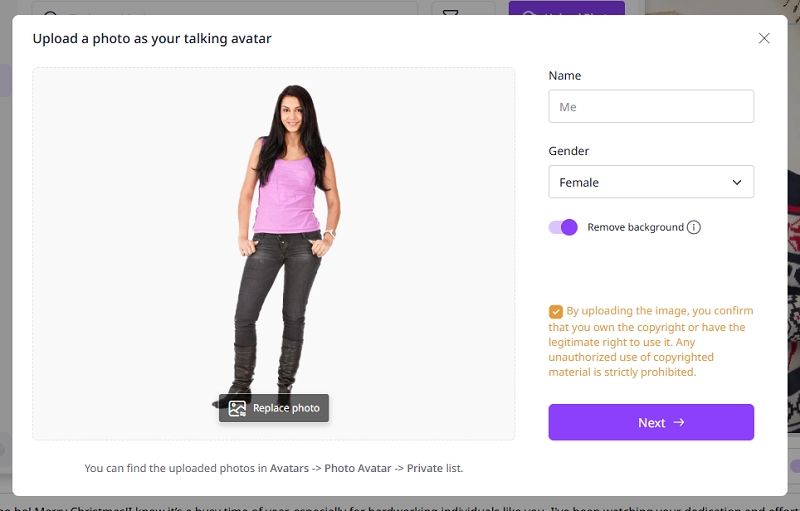
Now, click on “Avatar,” and then on “Upload Photo.” Make sure you upload a clear, front-facing photo with good lighting and expressions.
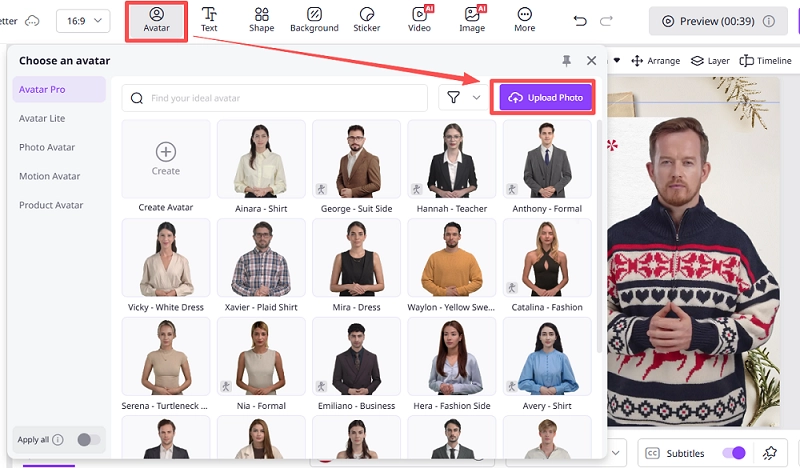
You can either upload a portrait or a full-body picture of yourself. Then finish the basic settings of the avatar including name, gender and background removal.
Step 4 Customize the Video Card
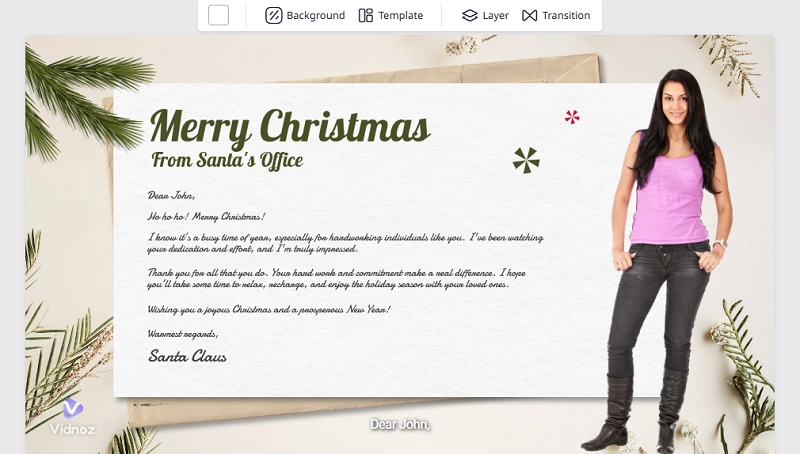
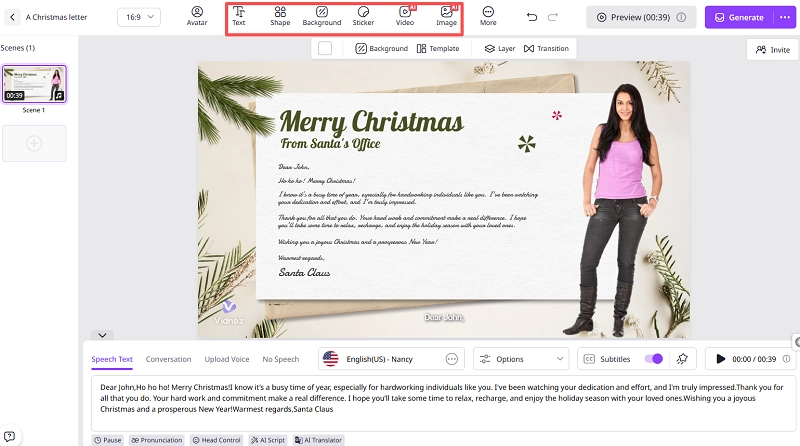
Want to edit on-screen texts, add images, stickers, videos, etc., in the free Christmas video with your face? With Vidnoz, you’re free to edit almost everything, so the end result matches your expectations. You can also change backgrounds and templates and add transitions as desired.
Step 5 Video Voiceover Editing
On the bottom, you’ll find options for voiceover editing. Paste your script, and choose a text-to-speech voice (in your preferred language). You can also upload a short voice recording to keep it truly yours. Then, Vidnoz will sync your audio to the avatar.

Step 6 Preview and Generate
And finally, it’s time to preview your outcome. Click on “Preview” to check timing, lip-sync, and on-screen text. If you’re satisfied with the result, simply export the video in your desired format. This free Christmas video maker with your face also provides quick sharing links.

Vidnoz AI - Create Free Engaging AI Video with Talking Avatar
- Easily create professional AI videos with realistic avatars.
- Text-to-speech lip sync voices of different languages.
- 2800+ video templates for multiple scenarios.
Way 2. Elf Yourself for a Funny Christmas Video Creation with Your Own Face
Are you a fun-loving person who wants to create some silly, zero-fuss Christmas dancing videos with your face instead? Elf Yourself can be your best bet! This app has been a forever favorite among fans for years due to its ability to create lightweight viral videos that appeal to everyone.
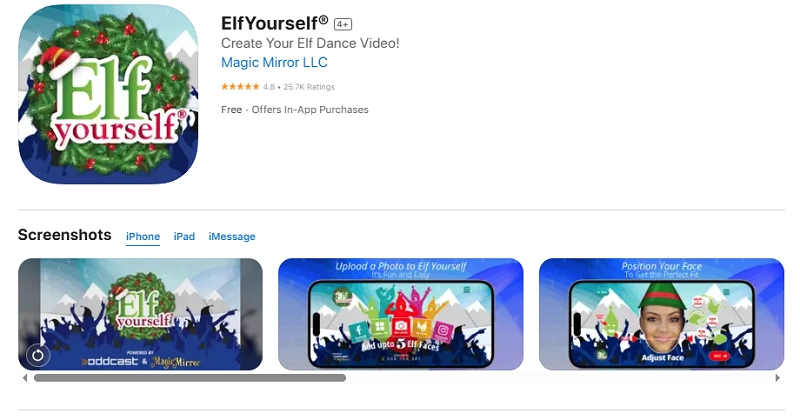
This app places one to five faces on dancing Elf bodies inside pre-made choreographed clips, which makes it perfect for family laugh-outs and quick social posts. Let’s see what features make it a go-to choice for Christmas dancing videos:
- Add up to 5 faces to a scene, so the whole team or family can star.
- Offers a library of holiday skits and Christmas dance templates to choose from.
- Simple face-crop interface to help users crop and position as they want.
- Sharing and downloading videos is pretty convenient and time-saving.
Here’s how you can make a Christmas dance video with your face in simple steps:
Step 1 Install Elf Yourself (iOS or Android) and then open the app.
Step 2 Tap Create → upload photos (face-forward, crop as prompted). Now, position the face on the elf's head.
Step 3 Choose a Christmas dance template and preview it. You can also add text overlays and music if you want.
Step 4 That’s it. Just save or share your video with your friends and family to enjoy their reactions on Christmas Eve.
Conclusion
All in all, creating a free Christmas video with your face is now easier and more fun than ever before. With the two amazing platforms mentioned above, you can create a warm talking greeting (Vidnoz) or a silly dancing elf (Elf Yourself) in no time.
While the Vidnoz Christmas video maker with your face offers polished talking avatars, editable Christmas templates, and lip-sync speech, Elf Yourself also comes in handy to make your holiday a bit more entertaining.
So what are you waiting for? Just try these tools and spread love, laughter, and sentiments on this special day!









![Create Talking Santa to Have More Fun this Christmas [AI Tool]](https://www.vidnoz.com/bimg/talking-santa.webp)
![12 Best Christmas Music Videos of All Time [Updated 2026]](https://www.vidnoz.com/bimg/best-12-christmas-music-videos-.webp)