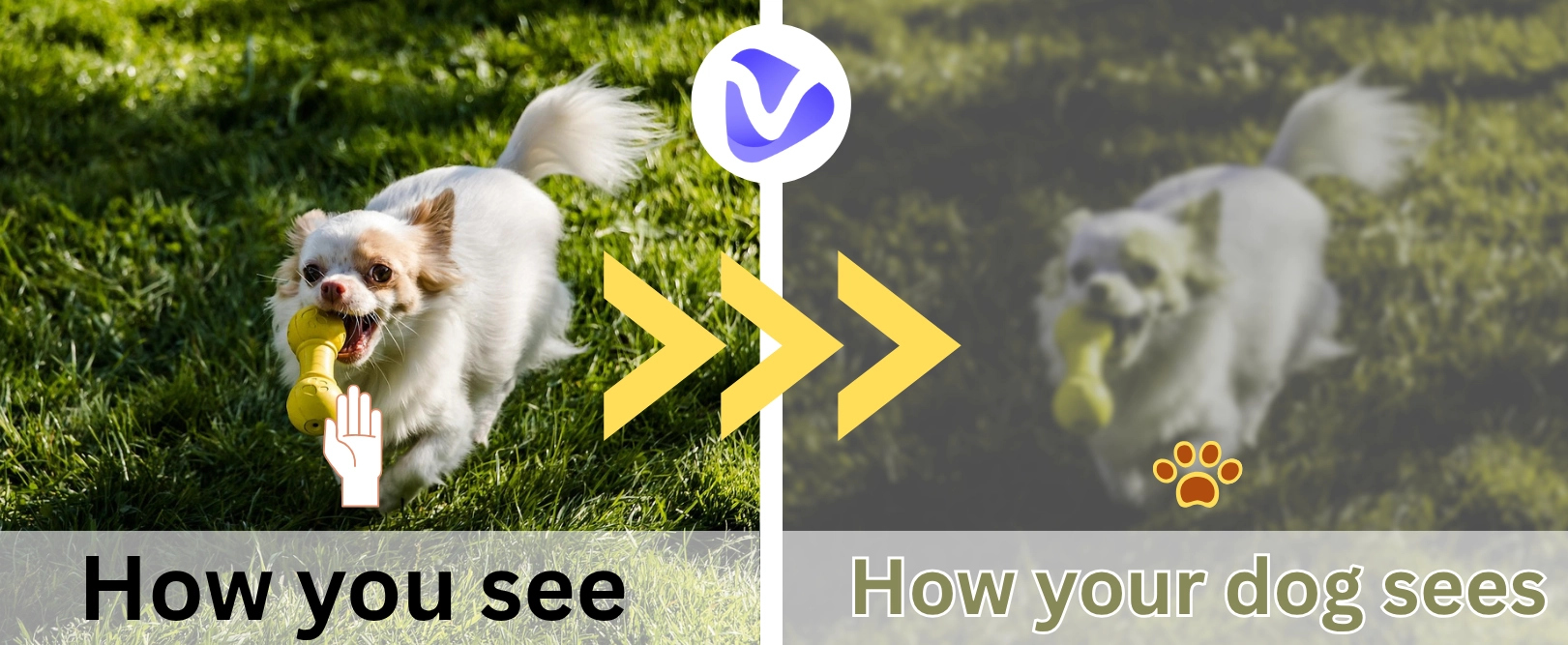
Have you ever wondered why your dog sometimes can’t retrieve objects quickly? Maybe your fur pal’s eyesight is the reason why it misses the toy you just threw or walked right past it. We all know that dogs’ vision isn’t the same as ours, but most people often think dogs see the world in black and white. That’s not true, dogs actually can still see some colors.
So how can you know the real world in your lovely puppy’s eyes? Stop guessing anymore, dog vision filters immerse yourself in your dogs’ eyes. In this article, we’ve got a list of 4 best choices you can try.
- On This Page
-
What is a Dog Vision Filter?
-
4 Dog Vision Filters to Simulate How Dogs See the World
1. Snapchat Dog Color Filter - Know What Colors Dogs Can See in Real Time
2. Woofme Vision Converter - Accurate Dog Vision Simulation Tool
3. Animal Vision - Dog Vision App for Android
4. Dog Optics - Dog Vision App for iOS
-
How Can Dog Vision Filters Help You?
-
Bonus: Make Entertainment Videos for Dogs in Colors They Can See!
Steps to Making a Dog Video
What is a Dog Vision Filter?
Well, the first question you would be asking after reading that is “What is a dog vision filter?”. Simply put, it’s a tool or feature that allows you to see through the eyes of your puppers by simulating all of the different aspects that affect their sight.
Aside from only seeing colors like yellow, blue, and gray, dogs tend to see less detail, meaning distant objects may appear blurry.

Image from woofme.ie
They also have better night vision than humans because of a special layer in their eyes. What’s more, while humans have 20/20 vision, dogs have around 20/70, so they usually have worse eyesight than we do. But they make up for this limitation by having a wider field of view.
While it’s one thing to talk about the different ways they see things, nothing beats the experience of seeing it with your own eyes. Now, let's explore those dog vision filters.
4 Dog Vision Filters to Simulate How Dogs See the World
1. Snapchat Dog Color Filter - Know What Colors Dogs Can See in Real Time

First up is the Dog Vision filter on Snapchat. If you’ve searched for a dog color filter, this is probably the one you found. You don’t need to install anything new since it’s built into Snapchat. It’s easy to use: just tap or swipe to see through your camera like a dog would.
It shifts the colors to match a dog’s view, where blues and yellows stand out and other colors fade away.
That’s about it, though. It only shows color differences yet can’t simulate how dogs see in low light or how blurry their vision can be.
How to Apply the Dog Color Filter:
Step 1.Open your Snapchat and search for the “dog vision lens”;
Step 2.Tab it and you’ll automatically go to your camera:

Step 3.Simply click to turn on dog vision:

2. Woofme Vision Converter - Accurate Dog Vision Simulation Tool

Next is the Woofme Vision Converter. This is an online dog eyesight filter, so you can simply use it to make a quick switch in dog visions. In a few clicks it’ll take your image and convert its colors into the same spectrum as a dog’s. It provides plenty of details on how dogs see the world as realistically as possible.
But you can't use this dog vision filter for videos and it takes a bit to process.
How to Apply the Dog Vision Filter:
Step 1.Upload an image and set-up the conversion preferences
You can even turn on Deuteranopia and decrease brightness discrimination and visual acuity to simulate dogs’ eyesight more precisely.
Step 2.Tab to process the image
You can immediately spot the difference and even see the visual blur that dogs experience in their whole life:

3. Animal Vision - Dog Vision App for Android

The best option for Android users is the Animal Vision app. This tool takes your camera roll and makes vision changes on how dogs(or other animals) see things differently. That’s right, not just dogs. You can test out other animals’ visions, like your cat.
This app’s “how dog sees the world filter” works in real time, making it great for on-the-fly decisions. The problem is that the downside comes with the undetermined realism and accuracy.
How to Apply the Dog Eyesight Filter:
Step 1.Download the app through the Google Play Store;
Step 2.Give the app permission to access your camera;
Step 3.Apply the dog vision filter
Click on the Dog icon in the Animals Section and you’ve successfully switched into dogs’ vision:

>> Customize a video that your dogs could see clearly using the Vidnoz free AI video generator!
4. Dog Optics - Dog Vision App for iOS

iOS users can also find a dog vision filter as there is an app called Dog Optics. It’s essentially the Android version of the previous app as it also lets you use the dog vision simulation in real time! It’s got a great spectrum, so you can even switch between the human and dog vision while recording.
However, this app only simulates dogs' vision in colors rather than blur effects that dogs really see.
How to Apply the Dog Vision Filter:
Step 1.Install the App through the App Store;
Step 2.Open the app and start dog vision experience;
Step 3.Press the Dog icon with sunglasses to toggle between human and dog vision;


You can both take photos and record videos to capture the vision difference between humans and dogs.

How Can Dog Vision Filters Help You?
So what’s the point of using the dog vision filter? Here are some use cases our team love:
- Knowing More About Dogs Habits
First, it helps you understand your dog better. It’s a simple way to see how the world is like in your dogs’ eyes. For example, your dog loves a certain toy because that one is colorful enough for dogs to see clearly.
- Preparing Proper Gifts to Your Dogs’ Liking
It also helps when picking gifts for your puppies. If you know what colors or shapes stand out to them, you're more likely to choose a proper one they’ll really play with.
- Seeing What You Would Look Like in Dogs’ Eyesights
You can even see what you look like to your dog. That might explain why they act a little nervous or excited in some situations.
- Choosing Colorful Visuals for Dogs
Lastly, if you leave the TV on for your dog while you're at work, this can help you pick the right kind of videos, ones with colors they can actually enjoy.

Screenshot from YouTube @relaxmydog
Bonus: Make Entertainment Videos for Dogs in Colors They Can See!
Since some dog vision filters let you record clips, you can stitch them together into a short video! It would be the killer solution to ease your dogs when you go to work or any situation where you have to leave them home.
Steps to Making a Dog Video
Step 1.Capture some clips that dog can see clearly
You can use dog vision apps like the Snapchat Dog Vision Lens or the Dog Optics app to taping from dogs’ eyesights. For example, you can film your dog’s favorite spots or a walk in the park.
Step 2.Stitching clips using a video editor
To easily combine your clips into a video, you can try Vidnoz free AI video generator.
This online video editor offers many video templates for quick clips stitching. And it can help to dub you a dog-friendly video in your own voice, which effectively comforts your dogs. Besides, you don’t need fancy gear, you can create a video that’s customized only for your puppies just on your phone!

Vidnoz AI - Create Free Engaging AI Video with Talking Avatar
- Easily create professional AI videos with realistic avatars.
- Text-to-speech lip sync voices of different languages.
- 2800+ video templates for multiple scenarios.
Step 3.Finish the dog video generation
Once you’ve done those edits, you’ll get a short dog video made in the colors and shapes your dog can actually see!
Conclusion
Dog vision filters let you see through the eyes of your favorite fur-friend. Those apps/sites simulate how dogs see the world, and thus, enhance the connection between you and your dogs. What those filters help furtherly is that if you want to show more love for your dogs, you can try to make an engaging dog video that is really attractive and colorful for your puppies!





![Free Dog Name Generators 2026 [Tested & Provide Links]](https://www.vidnoz.com/bimg/vd---dog-name-generator.webp)